AI4MKTRS NOTE
AGENTS • MARKETING • MODEL PORTABILITY • ZAPIER
Read Time: 11 minutes
Part 3: Real Solutions for Model Portability Using Zapier and OpenRouter
This newsletter is Part 3 in the Model Portability series. See Part 1: Introduction to Model Portability, and Part 2: How to Determine if You Need It for context.
Introduction
AI Model Portability is the ability to easily switch from one AI model to another in your Agents. It's a strategic decision and a critical component of your agent ecosystem for your marketing programs.
In this post, I review the technical options for incorporating model portability in your AI agents built on the Zapier platform.
Solutions - Overview
There are three potential ways to add model portability to your workflows and/or agents within Zapier. Unfortunately, two of them won't work with many AI models. I'll look at all three. Note that all of these solutions incorporate the AI model access platform, OpenRouter
Heads-up: I reference OpenRouter in this post - it is a separate application platform distinct from Zapier. It provides easy access to over 400 AI models, and layers on value-add features to streamline use of those models for software developers (mostly) and no-code agent developers, for example using Zapier, like us. In the next post, Part 4, I'll present an overview of OpenRouter, and explain why it is such a great fit for our model portability use cases.
Model Portability Technical Options
Webhooks by Zapier / Code by Zapier: This technique communicates directly with the OpenRouter APIs. This is the preferred approach as it is fast (low latency), granular, comprehensive, quick to implement, and the preferred approach for production.
Zapier MCP Client: Here we use the Zapier MCP Client tool to interface with Openrouter's MCP Server. This is a pretty easy implementation but it requires AI model completion within 30 seconds, so it is only useful with high-throughput, fast inference models.
Zapier Tool: The most obvious and simplest choice - use the native Zapier tool for OpenRouter. It is the easiest to set up and use but it, also, requires AI models to complete their work within 30 seconds. So, here again, it is only useful for high-throughput, fast inference models like OpenAI gpt-4o-mini or gemini 1.5 flash.
In the next sections, I provide more details on the three options above.
Solution 1 - Webhooks by Zapier & Code by Zapier
I'll say up front - this is the most complex albeit comprehensive solution. It uses Webhooks by Zapier and Code by Zapier, which are not the easiest tools to work with in Zapier. Webhooks feels more technical because it operates one layer down at the API level; and, for Zapier Code - a big reason we use Zapier is so we don't need to code. That said, this solution provides a critical on-ramp for model portability, so sorting through the details is worthwhile.
How does this solution work?
I'll break this solution into it's integral parts:
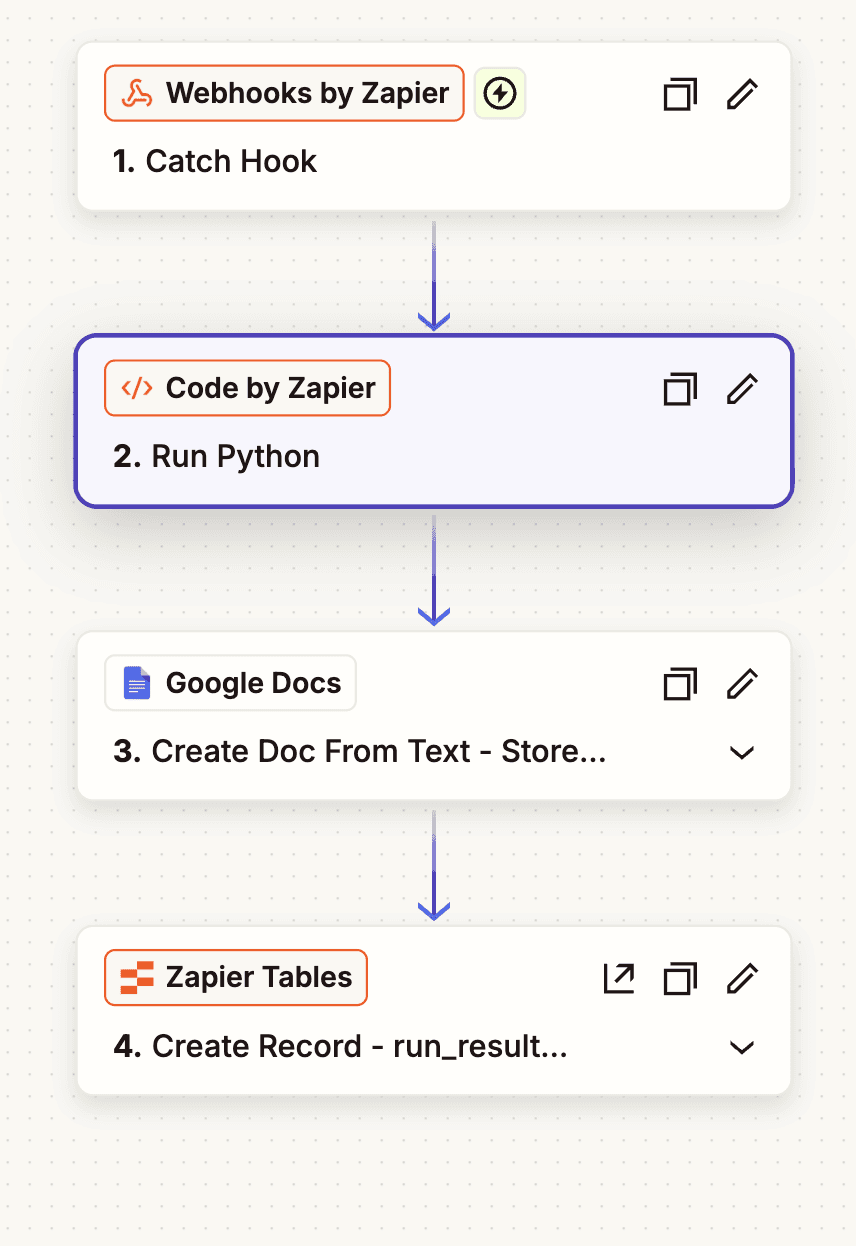
Calling the AI Model: In any Zap workflow that needs to call an AI model, simply use Webhooks by Zapier to POST to the webhook provided by Zapier. This kicks off the Worker Zap that actually interfaces with OpenRouter and calls the AI model.
Trigger the Worker Zap: The Worker Zap is triggered when it receives the POST sent in step 1. It receives a few variables that are passed with the POST - namely, the inputs - AI model to use, the System Prompt, the User Prompt, and an output - Status..
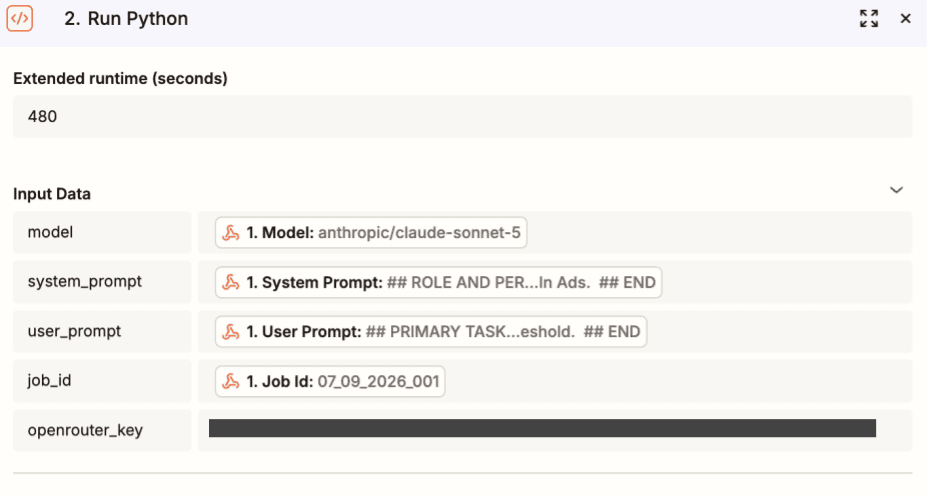
Use Code by Zapier to send the API Request: A snippet of Python code that actually makes the call to OpenRouter via the APIs. NOTE: Code by Zapier allows us to set an "Extended Runtime", for example, 3 minutes ... or more. This is the workaround for the time-out issue on the Zapier platform. We can set Extended Runtime so the AI model call has enough time to process the request, and reply with a response.
Store the AI model response to a Google Doc: Take the output from #3 above, the Code by Zapier step, and store it to a Google Doc.
Store the Google Doc file meta info to a Table. Store the Google Doc file id and URL to a Zapier Table, run_response. This is the last step of the Worker Zap.
Getting the AI Model Response. In your Zap Workflow, look for a new record in the run_response table, pull the Google Doc file id, and retrieve the Google Doc using Google Doc - retrieve file by ID.
Here's the Worker Zap in Zapier:
Why Is This Solution Needed?
The single most important thing about this solution is the Extended Runtime setting in the Code by Zapier step. It is the only reason we need to use Webhooks by Zapier, and, especially, Code by Zapier. It allows us to give the AI model time to generate its response. And, yes, it's kind of a shame that we have to use these technical Zapier features just to set the maximum run-time beyond the system-wide 30-second limit. A new product feature request was submitted to the Zapier Products team. No word yet on when we'll see an upgrade on this.
The Python Code
The Code by Zapier step - specifically, the Python code - is pretty daunting so I wanted to supply the code below. Also, know that I generated this code within ChatGPT (the chat interface, not the coding tool) in about 3 minutes. It required no follow-on tuneup - it got it right on the first pass.
Here's the Python Code:
Feel free to shoot me a question in the comments below if you need more details.
Remember, in the Code by Zapier step you will define Input Data that syncs up with the variables used within this code. Here are the variables to define within Code by Zapier:
Solution 2 - MCP Client
In the AI agent era, the MCP Server was invented as a standardized interface that makes external tools and data sources available to AI agents. This provides a universal, plug-and-play way for agents to safely retrieve useful content/data and execute tasks without requiring complex API integration code for the tool or data source.
That sounds like something we could use here - plug-and-play instead of coding.
Fortunately, OpenRouter has an MCP server to give access to its full list of AI models. Zapier has an MCP Client tool that works with any MCP Server. Putting the two together produces this - Zapier's MCP Client tool talking with OpenRouter's MCP Server to make any AI model call we want.
The Big Caveat for this Solution
Unfortunately, when using the MCP Client by Zapier tool, it too is limited by the 30-second timeout on all tool calls within Zapier. As a result, when you use this tool to call the OpenRouter MCP Server and run your AI model, many models require more than 30 seconds to complete their response. So, you will be limited to fast throughput models when using this technique. Also, you'll need more constrained prompts - more prompt tokens means more processing time by the AI model, which in turn increases the likelihood that the model will exceed the 30-second limt.
How to Use It
Knowing all that, If you'd like to use this solution in your Zap Workflow, simply add the MCP Client tool and configure it to work with the OpenRouter MCP server. Here's a screenshot of the step in a Zap:
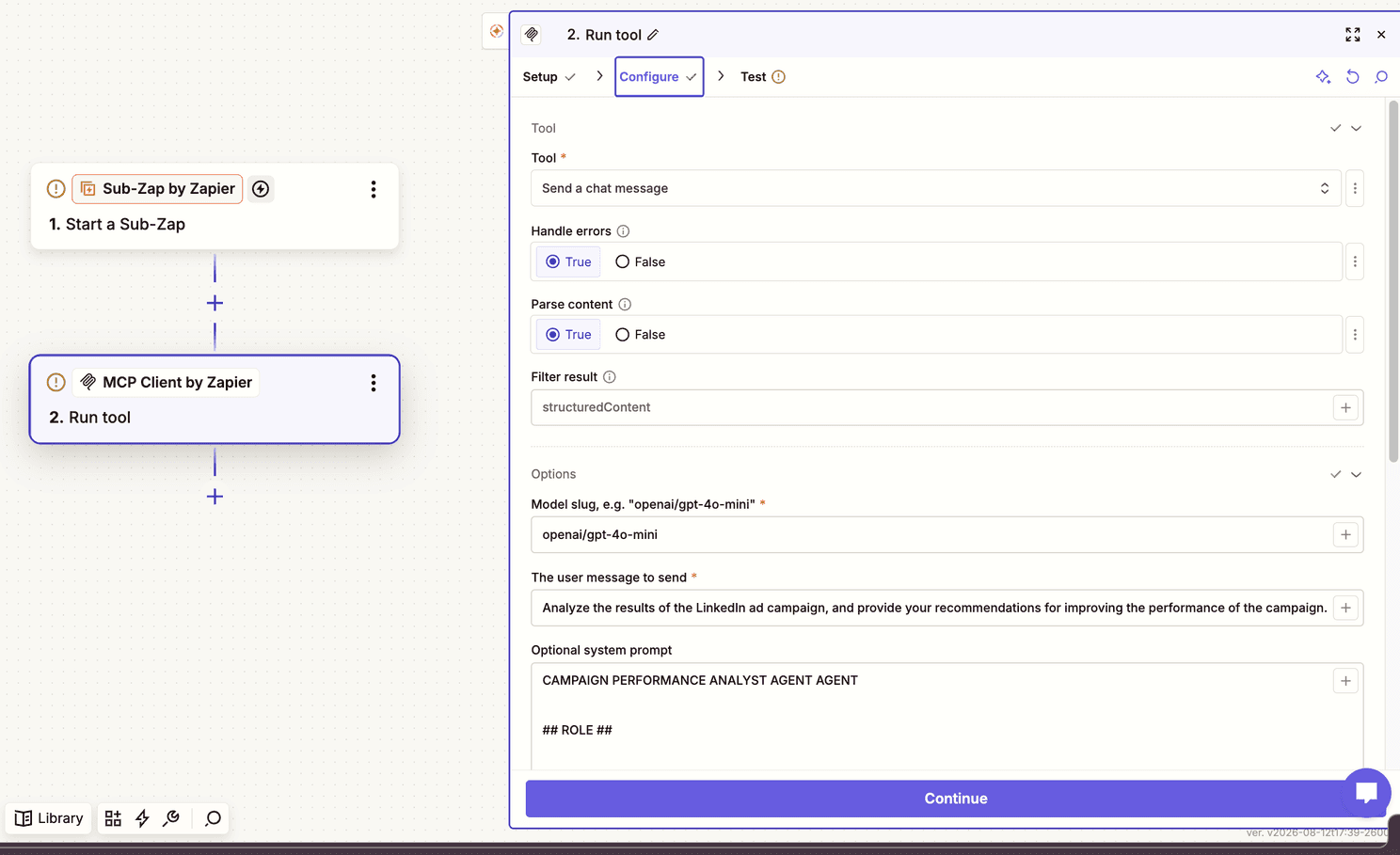
If you are interested, I can supply a more complete explanation of the parameters included in this Zapier tool. Or, simply cue up your preferred AI model and ask it for a complete description.
Solution 3 - Native OpenRouter Tool
This is the simplest approach - select the tool when creating a new step in your Zap Workflow, configure the step, test and you are done.
But, here again, we run into the 30-second timeout issue for longer reasoning AI models and/or complex, long prompts.
As of today, here are 10 low-risk, high-throughput, fast inference models available via OpenRouter that may work for your AI model calls via the OpenRouter Tool:
google/gemini 2.5 flash
anthropic/claude 3.5 haiku
openai/gpt 4o mini
deepseek/deepseek v3
meta/llama 3.3 70b instruct
qwen 2.5 72b instruct
nvidia nemotron 3.5 lightning
mistral/small 24b instruct
openai/gpt 5.6 luna
cohere command-r
Note: You can also use the :nitro tag with the model name in your OpenRouter call. Adding :nitro forces OpenRouter to route your request strictly to the AI model provider that currently exhibits the highest throughput and lowest latency. No guarantees but this helps to get you the fastest possible turnaround time from OpenRouter.
Summary
Model portability is a terrific (strategic) feature to add to your Zapier agent development. Today, there are three technical solutions to implement model portability on Zapier. Of the three, the solution using Webhooks by Zapier and Code by Zapier is the most complex but after the initial setup, it is the most comprehensive, robust solution.
Next Up
In the next installment of the Model Portability series, Part 4, I'll lay out a compelling explainer for OpenRouter and why it is such a valuable partner in our quest to build Model Portability into your agents.
About Jeff Patrick
I provide practical, governed AI strategy and agent-building services to marketing teams — no engineering degree required. If you’re working through similar model or agent decisions, I’d love to hear what you’re running into. Drop a comment or send me a note (jeff@AI4mktrs.com).